
Download Cleve – AI‑Powered Content Creation Tool for Writers, Marketers, and Creators
Overview
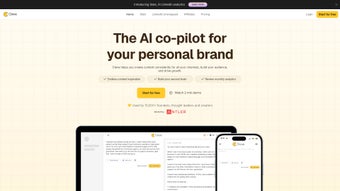
Cleve is a subscription‑based, web‑hosted workspace built around artificial intelligence to help content creators turn fleeting ideas into fully‑optimized posts with speed and confidence. Whether you’re a freelance blogger, a social‑media manager, or a thought‑leader who needs to publish regularly, Cleve offers a structured environment that reduces writer’s block, surfaces trending topics, and guides you through every step of the drafting process. The platform’s hallmark is its “guided‑question” engine: as soon as you start a new project, Cleve asks a series of focused prompts designed to spark creativity, clarify your target audience, and outline the core points of your piece. This not only accelerates brainstorming but also ensures that the final output aligns with SEO best practices.
Beyond ideation, Cleve integrates a robust editing suite. Users can highlight text, apply inline edits, and insert multimedia elements such as images, links, or embedded videos without leaving the interface. The tool’s Voice Mode adds a hands‑free layer, allowing busy professionals to dictate outlines, add paragraphs, or make quick revisions simply by speaking—perfect for on‑the‑go creators who juggle meetings, travel, or field work. Cleve also pulls in real‑time data from reputable news sources, letting you weave current events into your narrative, thereby boosting relevance and shareability. All of these capabilities are wrapped in a secure, cloud‑based environment that stores your drafts, version history, and collaborative notes, making it easy to switch devices or team members without missing a beat.
In short, Cleve positions itself as an all‑in‑one AI assistant for the modern content ecosystem. Its blend of brainstorming prompts, voice‑driven input, trend monitoring, and fine‑grained editing tools makes it a compelling choice for anyone looking to elevate their brand presence, increase publishing frequency, and maintain high quality across all channels.
Key Features
- Guided Question Engine: Dynamic prompts that help you flesh out ideas, define target personas, and outline article structure in minutes.
- Voice Mode: Real‑time speech‑to‑text conversion for drafting, editing, and navigating the workspace without typing.
- Trending News Integration: Automatic feed of current events and industry headlines to keep your content fresh and SEO‑friendly.
- Inline Editing Suite: Highlight, edit, and insert images, links, or embed code directly within the document.
- Collaboration Hub: Share drafts with teammates, assign comments, and track version history in a secure cloud environment.
- AI‑Powered Optimization: Real‑time suggestions for headline strength, keyword density, readability scores, and meta‑description generation.
- Multi‑Device Sync: Access your workspace from any browser on Windows, macOS, Android, or iOS without losing progress.
- Secure Subscription Model: End‑to‑end encryption, GDPR compliance, and regular backups to protect your intellectual property.
Each feature is designed with productivity in mind. For example, the Guided Question Engine not only sparks creativity but also records your responses, turning them into a structured outline that can be expanded with a single click. Voice Mode leverages advanced natural language processing to recognize industry‑specific terminology, reducing the need for manual correction. The trending news module is powered by curated APIs from reputable publishers, ensuring that the data you receive is both timely and trustworthy.
Furthermore, Cleve’s AI‑Powered Optimization works like an on‑demand SEO consultant. As you write, the system evaluates headline impact, suggests keyword alternatives, and highlights readability issues, allowing you to publish content that ranks higher without needing a separate SEO tool. The collaboration hub supports role‑based permissions, so editors can lock certain sections while writers continue drafting, maintaining a smooth workflow even in larger teams.
Installation & Usage Instructions
Getting Started
Because Cleve is a cloud‑native web app, there is no traditional “installation” process. To begin, navigate to cleve.ai, click the “Start Free Trial” button, and create an account using your email address or a Google/Apple ID. After confirming your email, you’ll be taken to the dashboard where you can select “New Project” and choose a template (blog post, newsletter, social media carousel, etc.). The guided question flow launches automatically, and you can answer each prompt in the order presented or skip to focus on specific sections.
Using Voice Mode
To activate Voice Mode, click the microphone icon located on the toolbar. The first time you use it, your browser will request permission to access the microphone—grant this access for a seamless experience. Speak clearly and use punctuation commands such as “comma,” “period,” or “new paragraph” to control formatting. Voice Mode also supports “replace [word] with [new word]” commands, enabling quick edits without touching the keyboard.
Saving & Exporting
All work is auto‑saved to the cloud every few seconds. When you’re ready to publish, click “Export” to choose from formats like Markdown, HTML, or PDF. You can also push the content directly to popular CMS platforms (WordPress, HubSpot) via built‑in integrations, eliminating the need for manual copy‑pasting.
Tips for Maximum Efficiency
- Start with the “Trending News” panel to discover hot topics that align with your niche.
- Use the “Keyword Suggestion” tool early in the drafting phase to embed SEO‑friendly terms naturally.
- Leverage the collaboration feature to get instant feedback from editors before finalizing the piece.
- Regularly review the “Readability Score” to keep your content accessible to a broad audience.
Cleve works on any modern browser (Chrome, Firefox, Safari, Edge) across Windows, macOS, Android, and iOS devices, making it truly platform‑agnostic.
Pros, Cons & Frequently Asked Questions
Pros
- AI‑driven brainstorming eliminates writer’s block and speeds up idea generation.
- Voice Mode enables hands‑free drafting, perfect for multitaskers.
- Integrated SEO suggestions reduce reliance on external tools.
- Real‑time trending news keeps content relevant and timely.
- Secure, cloud‑based storage ensures access from any device.
Cons
- Subscription cost may be a barrier for hobbyist writers on a tight budget.
- Voice recognition, while strong, can misinterpret niche jargon without manual correction.
- Limited offline capability; an internet connection is required for full functionality.
FAQ
Is there a free version of Cleve?
Cleve offers a 14‑day free trial with full feature access. After the trial, you’ll need to choose a paid subscription to continue using the platform.
Can I use Cleve on mobile devices?
Yes. Cleve runs in any modern mobile browser on Android and iOS, and the Voice Mode works just as well on smartphones and tablets.
How does Cleve ensure my data is secure?
All data is encrypted in transit (TLS 1.3) and at rest (AES‑256). Cleve complies with GDPR and provides regular backups, so your drafts are safe and recoverable.
Can I integrate Cleve with my existing CMS?
Yes. Cleve offers native integrations with WordPress, HubSpot, and Contentful, allowing you to push finished articles directly to your site.
What kind of customer support does Cleve provide?
Subscribers have access to 24/7 chat support, a comprehensive knowledge base, and weekly webinars that cover advanced AI writing techniques.
Conclusion & Call to Action
Cleve stands out in the crowded AI‑writing market by combining structured brainstorming, voice‑first drafting, and real‑time SEO optimization within a single, secure workspace. Its ability to pull in trending news and offer collaborative tools makes it especially valuable for professionals who need to publish quickly without sacrificing quality. While the subscription cost may be a consideration for casual writers, the productivity gains—and the reduction in reliance on multiple separate tools—often justify the investment.
If you’re ready to transform your content workflow, eliminate writer’s block, and keep your posts relevant to current events, download Cleve today and start your free trial. Experience the future of AI‑assisted writing and see how much more you can achieve in a fraction of the time.
Overall Rating: 4.5/5
Pros: AI brainstorming, Voice Mode, SEO suggestions, trend integration, cross‑device sync.
Cons: Subscription price, limited offline use, occasional voice‑recognition hiccups.



.png)



